Hcaptcha

How to Check if It’s the Enterprise Edition

🚨 Important: If you retrieve a value but website validation fails, this usually means the site is running on the Enterprise plan.

  • First, try using the fields marked as Enterprise in the documentation.

  • If those don’t work, reach out to the administrator for further assistance.


referer Parameter Explanation

🚨 Trigger Page URL Required

  • ✅ Copy the entire address shown in your browser’s address bar.

  • ❌ Do not edit the URL, and do not use developer tools to extract it.

Alternative method:

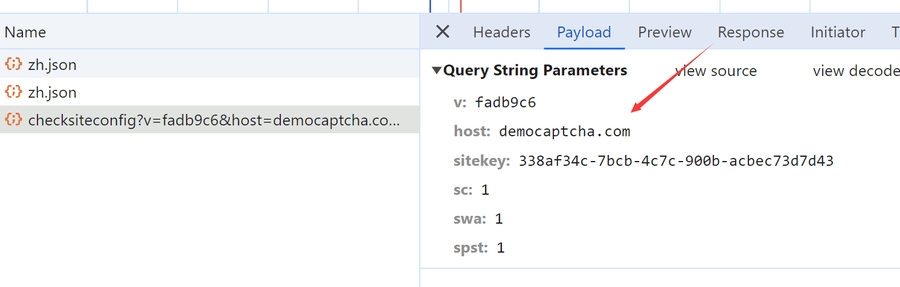
  • Locate the package as shown below.

  • Take the value of the host parameter.

  • Set referer to http://{host} (see image example).

Example:

http://democaptcha.com

hcaptcha

Request URL (POST):

Version
Endpoint

Universal

https://wtf.red/api/hcaptcha

Request Headers:

Header
Description
Required

x-api-key

User key, get from homepage

Yes

Content-Type

application/json

Yes

POST Data (JSON):

Parameter
Type
Description
Required

sitekey

String

hCaptcha integration key

Yes

referer

String

See parameter explanation above

Yes

rqdata

String

(Enterprise) Pass this value if captcha config returns captcha_rqdata/captcha_rqtoken (e.g. Discord channel join)

No

proxy

String

Format: ip:port or usr:pwd@ip:port or socks5://ip:port (contact admin if issues)

No

region

String

When using proxy, pass proxy region e.g. hk, sg

No

invisible

Boolean

Whether verification is invisible (default false)

No

need_ekey

Boolean

Whether to return E0_ey... (default false)

No

preflight_uuid

String

(Enterprise) Preflight ID for maintaining context (proxy region, UA, etc.) #Preflight API

No

Response Data (JSON):

Parameter
Type
Description

status

Integer

Success status: 1=success, 0=failure (use this to determine status)

msg

String

Result message in Chinese

id

String

Unique request ID (for logging/querying)

data.generated_pass_UUID

String

Verification pass UUID (P1_xxx/F1_xxx) for subsequent validation

data.ekey

String

Verification key (E0_xxx) for subsequent validation

cost

String

Verification time (milliseconds)

{
  "cost": "9187.84ms",
  "data": {
    "generated_pass_UUID": "P1_eyxxx",
    "user_agent": "..."
  },
  "id": "c5b976bd-4c01-4378-bb44-324c76e9fe0f",
  "msg": "验证成功",
  "status": 1
}

Last updated